Server settings
Restrict Musico to specific channels
Limit which text channels can use Musico's commands and which voice channels it can join, with /restrictchannels or the dashboard.
Keep music commands out of your general chat, or keep Musico in your music voice channels only.
With a command
/restrictchannels
Shows the current restrictions and lets you choose the allowed text channels (where commands work) and voice channels (where Musico can play).
In the dashboard
- Open the dashboard for your server.
- Under Channel Boundaries, click Add Channel next to Command Channels or Voice Channels and pick the channels.
- Click Save.
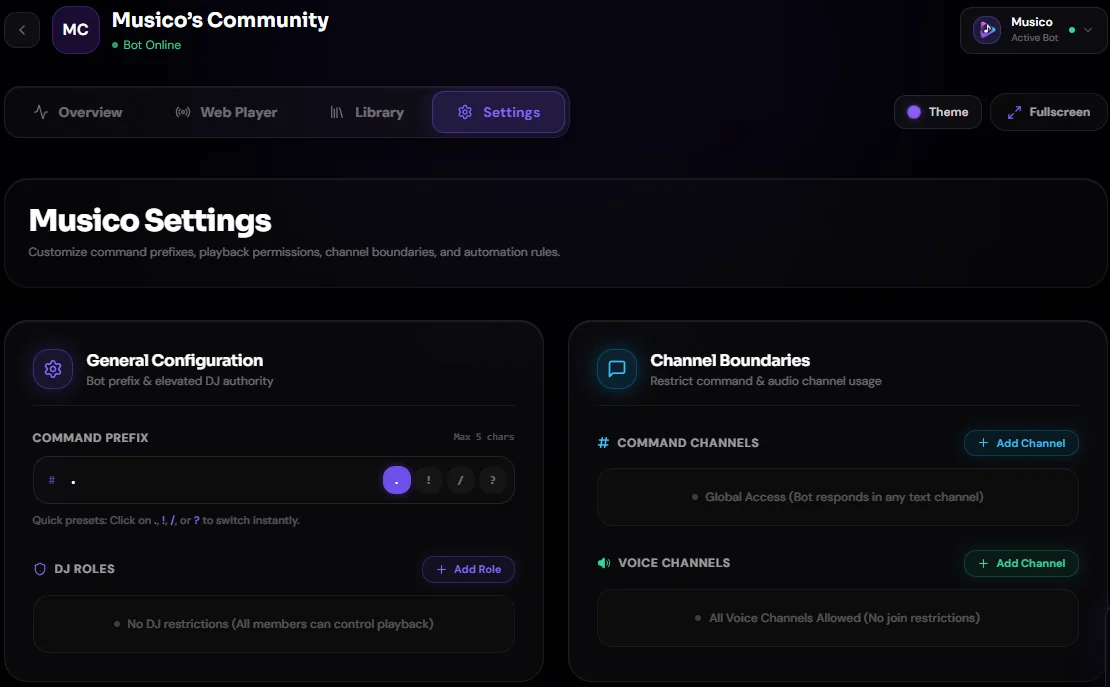
Leaving a list empty means all channels are allowed.
Tips
- A common setup is a single
#musictext channel plus one or two music voice channels. - Combine with DJ mode to control who can use Musico, not just where.
- If someone uses Musico in a channel that isn't allowed, Musico replies with an error message instead of running the command. If members report errors in one channel, check here first.
Still stuck? Ask in the Musico support server.