Playing music
Playback controls: pause, skip, seek and volume
Every Musico command for controlling the current song: pause, resume, skip, previous, seek, forward, rewind, replay, volume, stop and leave.
These commands control the song that's playing right now. If your server uses DJ mode, some of them may be limited to DJs.
Pause, resume and skip
| Command | What it does |
|---|---|
/pause | Pause the current track |
/resume | Continue a paused track |
/skip | Skip to the next song in the queue |
/previous | Go back and play the previous song |
/replay | Start the current song again from the beginning |
/nowplaying | Show the song that's playing and how far in it is |
Jump around inside a song
| Command | Example | What it does |
|---|---|---|
/seek <mm:ss> | /seek 1:30 | Jump to an exact time in the song |
/forward <seconds> | /forward 15 | Skip ahead by a number of seconds |
/rewind <seconds> | /rewind 10 | Go back by a number of seconds |
Volume
/volume <1-100>
Sets the playback volume for everyone in the channel, from 1 to 100. To change the volume Musico starts at in your server, use /defaultvolume. See Prefix and default volume.
Each listener can also change Musico's volume just for themselves: right-click Musico in the voice channel and use the User Volume slider. This doesn't affect anyone else.
Stop and disconnect
| Command | What it does |
|---|---|
/stop | Stop the music and disconnect Musico |
/leave | Disconnect Musico from the voice channel |
/join | Bring Musico into your current voice channel without playing anything |
Buttons on the Now Playing message
Every time a song starts, Musico posts a Now Playing message with buttons, so you don't need commands for the basics:
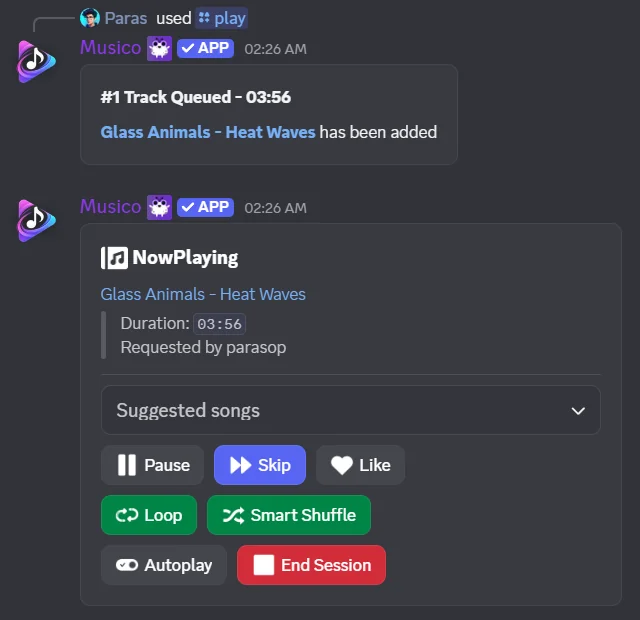
| Control | What it does |
|---|---|
| Suggested songs | Pick a related song from the dropdown to add it |
| Pause / Resume | Pause or continue the song |
| Skip | Skip to the next song |
| Like | Add the song to your liked songs |
| Loop | Turn repeat on or off. See Loop |
| Smart Shuffle | Shuffle the upcoming songs |
| Autoplay | Turn autoplay on or off |
| End Session | Stop the music and disconnect Musico |
The music panel has the same buttons, and the web player lets you control everything from your browser.
Still stuck? Ask in the Musico support server.