Getting started
How Musico commands work
Musico uses Discord slash commands. Type / to see them, fill in the options, and press Enter. Text commands with a custom prefix are supported too.
Musico is controlled with slash commands. Type / in a text channel and Discord lists the commands of every bot in the server. Pick one of Musico's, fill in any options it asks for, and press Enter.
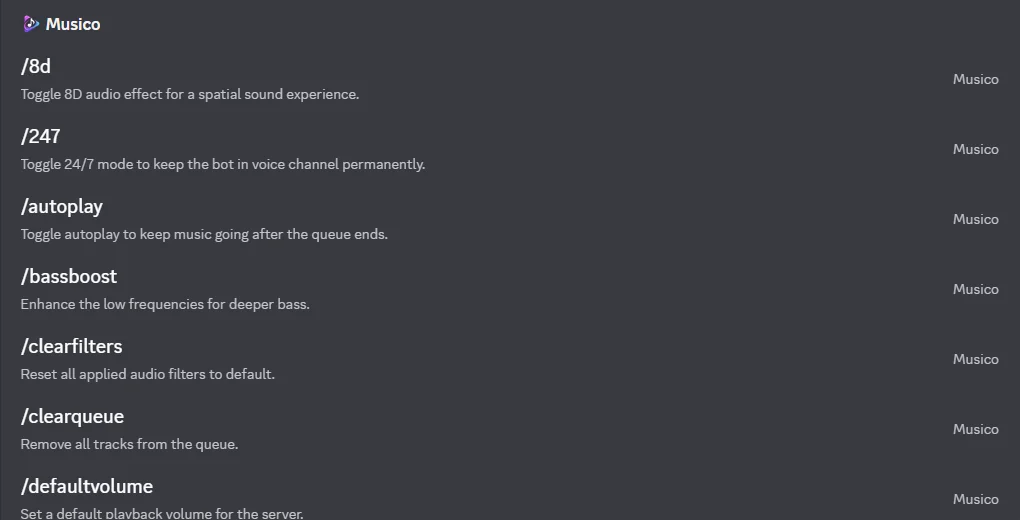
Reading command options
In these docs and on the command list, options are written like this:
| Written as | Meaning | Example |
|---|---|---|
<option> | Required: you have to fill it in | /volume <1-100> → /volume 60 |
[option] | Optional: you can leave it out | /lyrics [song] → /lyrics |
<a|b|c> | Choose one of the listed values | /loop <song|queue|off> → /loop queue |
Discord shows the options as fields after you pick a command, so you rarely need to type them by hand.
Text commands and the prefix
Besides slash commands, Musico also responds to text commands that start with your server's prefix. The default prefix is ., so .play lofi works the same as /play lofi. Server admins can change the prefix with /setprefix or in the dashboard. See Prefix and default volume.
Command categories
| Category | What it's for | Examples |
|---|---|---|
| Music | Playing and controlling songs | /play, /skip, /queue, /loop |
| Filters | Changing how the music sounds | /bassboost, /nightcore, /clearfilters |
| Playlist | Saving and replaying songs | /playlist save, /playlist library |
| Settings | Server configuration (admins) | /setdj, /djmode, /247 |
| Utility | Everything else | /premium, /sleeptimer, /ping |
The full, searchable list is on the commands page.
When a command doesn't work
- "You need to be in a voice channel": join a voice channel first.
- Nothing happens / the command isn't listed: see Commands not working.
- "Only DJs can use this command": the server has DJ mode turned on.
- A cooldown or vote message: the free plan has usage limits. Premium removes them.
Still stuck? Ask in the Musico support server.