Server settings
24/7 mode: keep Musico in your voice channel
Keep Musico connected to a voice channel around the clock with /247. Included in Musico Premium Silver, Gold and Diamond.
Most music bots leave the voice channel when the queue ends or everyone leaves. With 24/7 mode, Musico stays connected permanently, so music is ready whenever members drop in.
24/7 mode is a Premium feature, included in the Silver, Gold and Diamond plans. See Premium plans.
Turn it on
- Join the voice channel you want Musico to stay in.
- Start some music with
/play: a long playlist, a mix or a live stream. - Run:
/247
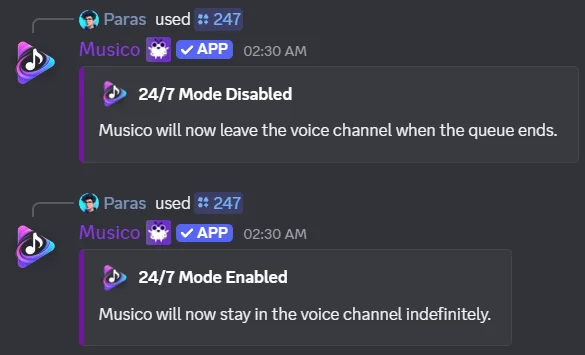
Musico replies 24/7 Mode Enabled and stays in the channel indefinitely. You can also use the 24/7 Mode toggle in the dashboard.
Turn it off
Run /247 again. Musico replies 24/7 Mode Disabled and will leave the voice channel when the queue ends. Or use /stop to stop the music and disconnect straight away.
Make it a nonstop radio
24/7 mode keeps Musico in the channel. To keep music playing, add one of these:
- Autoplay: queues similar songs when your queue runs out (also Silver+).
/loop queue: repeats your queue forever. See Loop.
Full walkthrough on the blog: How to set up a 24/7 lo-fi radio in your Discord server.
Related
- Sleep timer: stop the music at a set time while Musico stays.
- 24/7 music feature page
Still stuck? Ask in the Musico support server.