Playing music
Sleep timer
Use /sleeptimer to stop the music automatically after a set number of minutes, then extend or cancel it from the warning Musico sends before it ends.
Falling asleep to music, or want the party to end on time? The sleep timer stops the music after a set time.
/sleeptimer <minutes>
For example, /sleeptimer 30 stops the music in 30 minutes. Musico confirms with a Sleep Timer Set message.
The "ending soon" warning
One minute before the timer runs out, Musico posts a Sleep Timer Ending Soon message with two buttons:
| Button | What it does |
|---|---|
| Extend Sleep Timer | Gives you more time before the music stops |
| Stop Timer | Cancels the sleep timer; the music keeps playing |
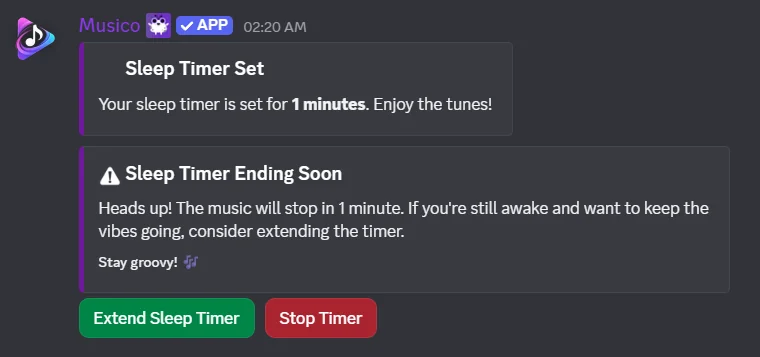
If you don't press anything, the music stops when the timer ends.
Good to know
- The timer counts down from when you set it, no matter how many songs are queued.
- To end the music earlier, use
/stopat any time.
The sleep timer works well with 24/7 mode when you want the bot to stay but the music to stop for the night.
Still stuck? Ask in the Musico support server.