Playing music
Autoplay: keep the music going
Autoplay makes Musico keep playing similar songs when your queue runs out. Available on Premium Silver, Gold and Diamond.
Normally, when Musico reaches the end of the queue, the music stops. With autoplay turned on, Musico picks similar songs and keeps playing, so the channel never goes quiet.
Autoplay is a Premium feature, included in the Silver, Gold and Diamond plans. Diamond adds smarter recommendations. See Premium plans.
Turn autoplay on
The quickest way is the command:
/autoplay
Run it again to turn autoplay off. You can also press the Autoplay button on Musico's Now Playing message.
From the dashboard
- Log in at musicobot.xyz and open your server. See Logging in.
- Go to Settings → Audio & Playback Automation.
- Turn on Auto-Play and click Save.
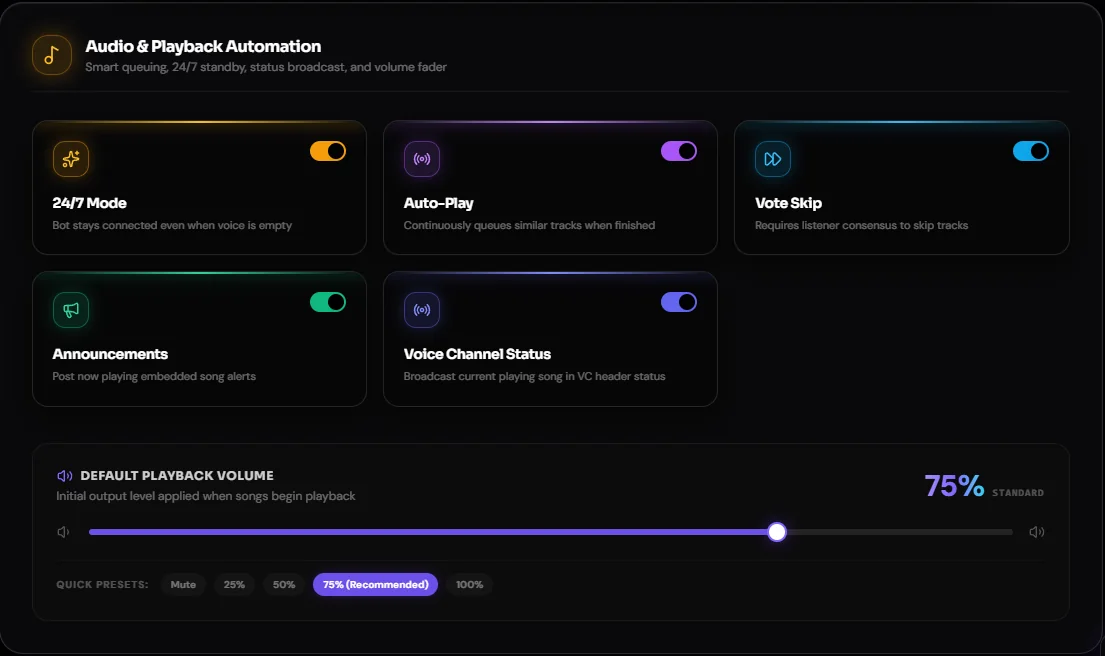
If your server doesn't have Premium, the dashboard toggle shows a Premium prompt instead.
How it picks songs
Autoplay looks at what was just playing and queues tracks that are similar to it. The more you play, the better it follows the mood of your channel. You can still /play your own songs at any time. They play first, and autoplay picks up again after them.
Autoplay + 24/7 = a radio station
Pair autoplay with 24/7 mode and Musico becomes a nonstop radio for your server: it stays in the voice channel and keeps the music coming. This is the setup used for lo-fi study rooms and chill AFK channels. There's a step-by-step guide on the blog: How to set up a 24/7 lo-fi radio.
Still stuck? Ask in the Musico support server.