Server settings
Music panel, announcements and voice channel status
Create a permanent music controller in a text channel with /musicpanel, and turn on now-playing announcements and the voice channel status.
The music panel
/musicpanel
Creates an interactive music controller in a text channel. Run it in the channel where you want the panel to live, such as #music.
The panel has the same buttons as Musico's "now playing" message, so members can control the music without typing commands. And members can request songs just by typing the song name in the panel's channel. No /play needed.
Good for:
- Members who don't know the commands: they type a song name and press Enter.
- Keeping all music activity in one channel. Pair it with Restrict channels.
Now-playing announcements
When Announcements is on, Musico posts a message each time a new song starts, so everyone in the text channel can see what's playing. Turn it on or off in the dashboard under Audio & Playback Automation.
Voice channel status
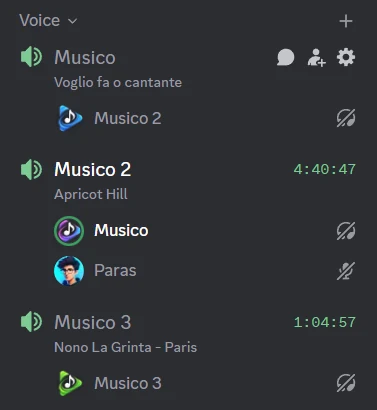
Discord voice channels can show a short status under their name. With Voice Channel Status turned on, Musico sets it to the song that's playing, so people can see what's on before they join. Turn it on in the dashboard.
Vote skip
With Vote Skip on, skipping a song needs agreement from the listeners instead of one person deciding. It's another way to keep things fair, alongside DJ mode. Also in the dashboard.
Still stuck? Ask in the Musico support server.