Audio filters
Audio filters
Change how the music sounds with Musico's audio filters: bass boost, nightcore, vaporwave, 8D, lo-fi, karaoke and more. How they work and how to reset them.
Audio filters change the sound of whatever Musico is playing, instantly, for everyone in the voice channel. Each filter is a single command.
All filters
| Command | Effect | Details |
|---|---|---|
/bassboost <mode> | Deeper, stronger bass (Low to Earrape) | Bass boost |
/nightcore | Faster, higher-pitched | Speed and pitch |
/vaporwave | Slower, lower, dreamy | Speed and pitch |
/slowmode | Slower, same pitch | Speed and pitch |
/timescale | Changes speed, pitch and rate together | Speed and pitch |
/8d | Sound that moves around your head | 8D, lo-fi, karaoke, lowpass |
/lofi | Warm, chill lo-fi sound | 8D, lo-fi, karaoke, lowpass |
/karaoke | Removes (most of) the vocals | 8D, lo-fi, karaoke, lowpass |
/lowpass | Softer, muffled high frequencies | 8D, lo-fi, karaoke, lowpass |
/clearfilters | Turn all filters off |
All of these are free. Premium Silver and above adds exclusive extra filters.
How filters work
- Start playing something with
/play. - Run a filter command, for example
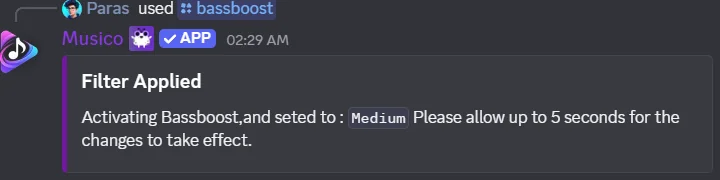
/bassboost medium. - Musico confirms with a Filter Applied message. Allow up to 5 seconds for the change to be heard. The filter stays on for the following songs too, until you change it.
You can apply filters one after another to stack effects. If the result sounds wrong, start over with:
/clearfilters
This resets every filter and brings back the original sound.
Good to know
- Filters affect everyone in the channel, not just you. In busy servers, DJ mode can limit who can change them.
- Filters can also be changed from the web player.
- Heavy filters (strong bass boost plus 8D, for example) can make some songs sound distorted. Use
/clearfiltersand try a lighter setting.
The audio filters feature page has a quick summary you can share with your members.
Still stuck? Ask in the Musico support server.