Premium
Custom bot: your own branded music bot
Run Musico under your own bot name, avatar and status. How the custom bot plan works, what it includes and how to set it up.
With a custom bot, your server gets a music bot with its own name, avatar and status, powered by Musico. Your members see your brand, not "Musico".
The custom bot is included in the Diamond plan ($7.99/month). It comes with all Premium features, every Musico bot (up to 6 bots including your custom one), 5 premium servers and a 7-day money-back guarantee. See the custom bot page.
What you get
- Your own bot name and avatar
- Your choice of status (Online, Idle, Do Not Disturb or Invisible) and activity ("Listening to…", "Playing…", "Watching…" or "Competing in…")
- High-quality audio and 24/7 playback
- Use on up to 5 servers
- Unlimited queue
- Setup handled by the Musico team
Set up your custom bot
-
Try a design. On the custom bot page, upload an avatar (PNG or JPG, up to 8 MB), enter a bot name, and choose a status and activity. The live preview shows how it will look in Discord.
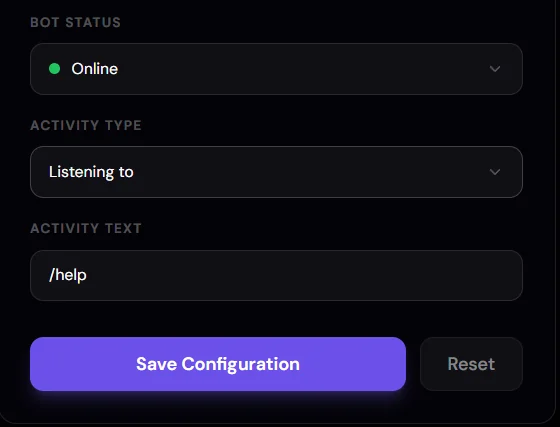
-
Click Save Configuration. This takes you to the Custom Bots dashboard at customs.musicobot.xyz, where your bot's settings live.
-
Subscribe. Click Get Started on the custom bot page to subscribe to the plan, if you haven't already.
-
We set it up. The Musico team prepares your ready-made bot with your name and avatar, usually within 24 hours.
-
Invite it. Add your custom bot to any of your 5 included servers and use it like Musico, with the same commands.
Manage your custom bot
Once your bot is ready, manage it at customs.musicobot.xyz. Log in with Discord and pick your bot from the switcher in the top-right corner if you have more than one.
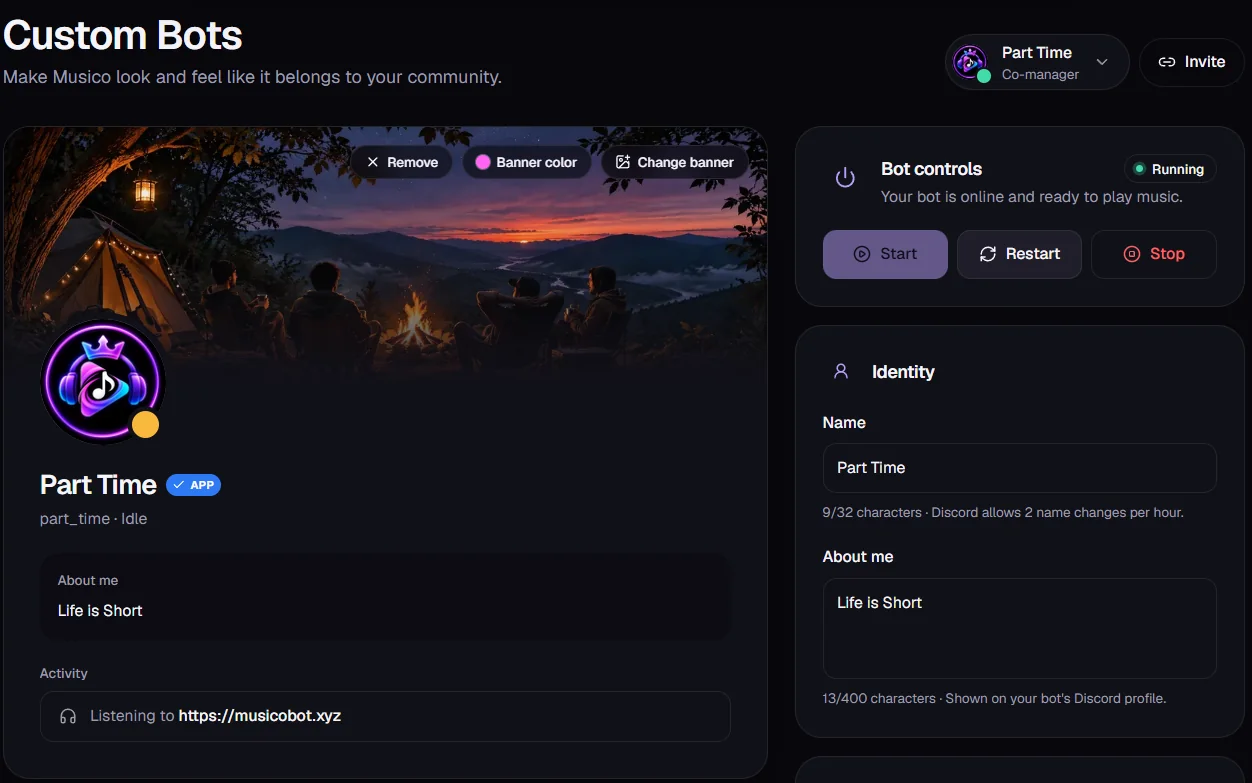
| Section | What you can do |
|---|---|
| Profile preview | See how the bot looks in Discord. Change banner, set a Banner color, or Remove the banner |
| Bot controls | See whether the bot is Running, and Start, Restart or Stop it |
| Identity → Name | The bot's name, up to 32 characters. Discord allows 2 name changes per hour |
| Identity → About me | The bot's profile bio, up to 400 characters |
| Activity | The status line, for example "Listening to …" |
| Invite | Get the link to add your bot to a server |
If the bot stops responding, try Restart in Bot controls before contacting support.
Do I need a Discord developer account?
No. Custom bots are ready-made: the Musico team creates and hosts the bot for you. You never need to touch the Discord Developer Portal or handle a bot token.
Still stuck? Ask in the Musico support server.